

Agentic Rollout
After the merge, Hud watches each change as it takes traffic, names the PR behind a regression, and helps you undo it.
A PR that passed review can still misbehave once real traffic reaches it. Agentic Rollout watches each change after it merges, fast-tracked PRs included. It compares the new version with earlier versions, for example the error rate and latency of the code that changed. When a change makes things worse, Hud names the PR behind it and can help undo it: it can turn off a feature flag, open a revert PR, or recommend a rollback through your CD.
Agentic Rollout runs on Hud's Sensor. It doesn't run on your observability stack alone.
How a change is watched
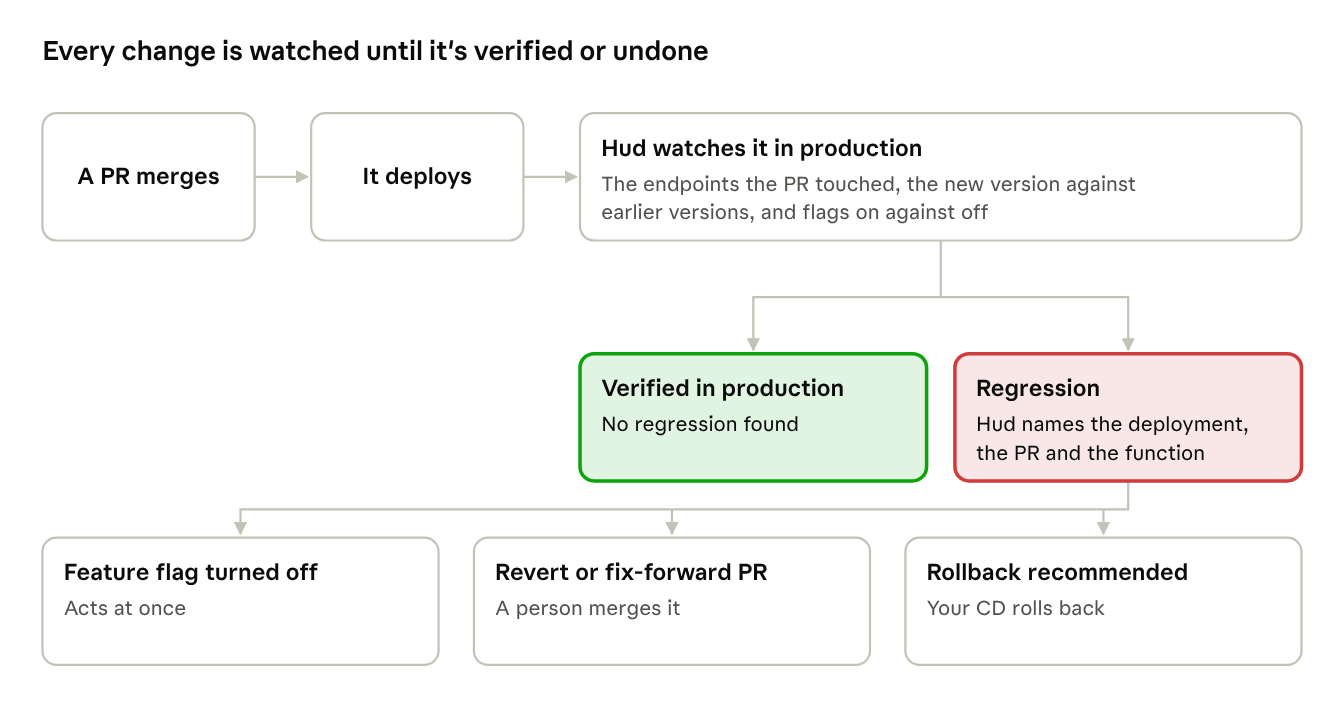
Once a PR merges and deploys, Hud watches it in production. If nothing gets worse, it's verified. If something does, Hud names the change and can turn off its flag, open a revert or fix-forward PR, or recommend a rollback through your CD.
What Agentic Rollout watches
| What | How Hud checks it | Where you see it |
|---|---|---|
| Each merged PR | Errors and latency on the endpoints the PR touched, for a set time after it merges | The PR's status on the Pull Requests page: Watching, then Verified in production |
| Each deployment | The new version compared with earlier versions, until Hud has seen enough traffic to decide | The Deployments page: Monitoring, Stable or Failing, with the likely PR. See Deployment monitoring |
| Each feature flag | The code behind the flag with the flag on, compared with the flag off | The Feature Flags page: Healthy, Low ON traffic or Degraded |
| The functions a change touched | Each changed function and the flows that run it, compared with their normal from the week before | An issue, with the function where the problem started. See Post-Deploy Issues |
If you use the Merge Gateway, the Hud agentic rollout box in your policy sets how long Hud watches each merged PR, and what happens on a regression. See After the merge.
When a change regresses
Hud names the change behind the regression: the deployment, the PR that most likely caused it, and the function where the problem started. Then it can act, depending on how you set it up:
- Turn off the feature flag behind the change. This acts at once.
- Open a revert PR or a fix-forward PR. Each one waits for a person to merge it, and it goes through the Merge Gateway like any other change.
- Recommend a rollback. A webhook can pass the recommendation to your deploy pipeline, so your CD rolls back automatically or after a person approves. Your rollback policy decides when a version can be rolled back.
- Alert the team in Slack.
To find the root cause and a fix, use Prompt to Fix or Auto Remediation.
What you need
- Hud's Sensor in each service you want watched, sending a deployment ID with each deploy. See Where Hud runs.
- GitHub connected, so Hud can link each deployment to its PRs.
- For the rest of the setup, including the webhook and the rollback policy, see Deployment monitoring.
What Agentic Rollout doesn't do
- It isn't your CD. Your deploy pipeline still ships the code, and it does the rollback when Hud recommends one.
- It doesn't merge its own fixes. A revert or fix-forward PR waits for a person.
- It doesn't watch problems a change didn't cause. For slowdowns over days, SLO breaches and errors, see Slowdowns over time, SLO rules and Errors.
Next steps
- Deployment monitoring: set it up, review your deployments, and connect the webhook.
- Post-Deploy Issues: what Hud flags in the functions a change touched.
- Analytics: deployments monitored, regressions caught, and how they were handled.
Updated about 4 hours ago