

Hud MCP in Cursor Automations
Build Production-Aware Developer Workflows
Cursor recently introduced Automations, which allow you to trigger AI workflows based on events like pull requests, schedules, or alerts.
By connecting Cursor Automations with Hud’s runtime intelligence, you can build automations that understand how your code actually behaves in production.
This enables workflows such as:
- PR Risk Assessment based on real production traffic
- Automatic issue triage when production errors appear
- Detecting performance optimization opportunities
- Identifying dead code that never runs in production
Instead of relying only on static code analysis, these automations use real runtime behavior from production systems.
How It Works
Cursor Automations can connect to Hud using the Hud MCP server.
Once connected, the automation can query production insights such as:
- Function invocation counts
- Endpoint/Queue traffic
- Error frequency
- Call graph relationships
- Runtime performance
This allows Cursor to reason about real production impact when analyzing code.
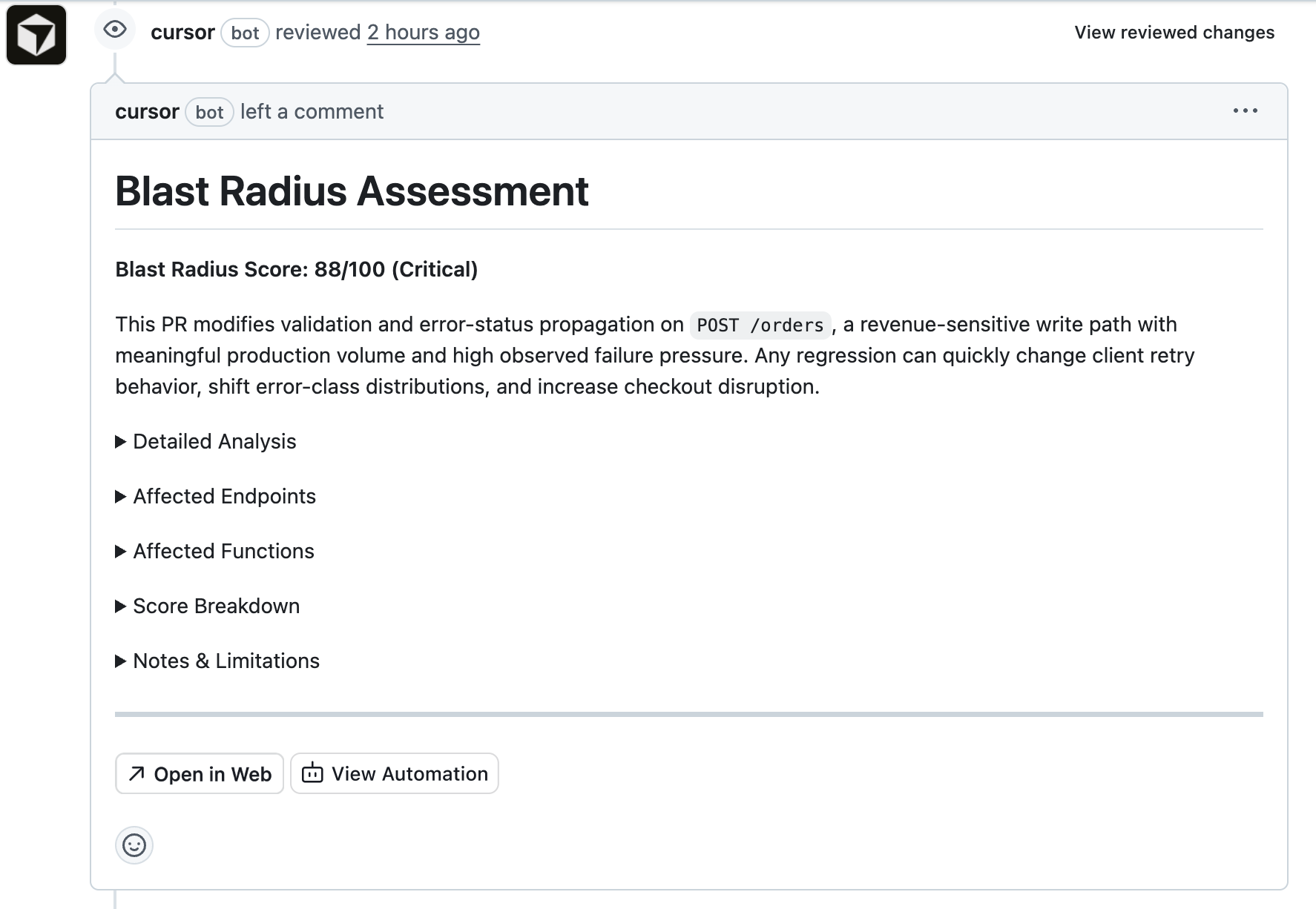
Example Workflow
Setup
1. Open Cursor Automations
Go to: https://cursor.com/automations
Create a New Automation.
2. Add the Hud MCP Server
Cursor Automations can query Hud through an MCP server.
Add a Custom MCP server and paste the following JSON:
{
  "mcpServers": {
    "Hud-MCP": {
      "command": "npx",
      "args": [
        "-y",
        "hud-mcp"
      ],
      "env": {
        "HUD_MCP_KEY": "YOUR_MCP_KEY"
      }
    }
  }
}
You can get your API key here:
https://www.app.hud.io/settings/api-keys?environment=production
Once configured, your automation can use @hud to query production insights.
Example: PR Risk Assessment
You can automatically evaluate the production risk of a pull request.
When a PR opens, the automation:
- analyzes the diff
- identifies impacted functions
- queries Hud for production usage
- posts a risk report in the PR
Example instructions:
<PROMPT>

  <ROLE_AND_OBJECTIVE>
    <ROLE>You are a senior reliability engineer and performance analyst.</ROLE>
    <OBJECTIVE>
      Given a GitHub pull request diff for a customer repository, compute the PR's blast radius in production by identifying affected functions and their impacted endpoints, then produce a ranked report and a single 0-100 Blast Radius Score.
    </OBJECTIVE>
  </ROLE_AND_OBJECTIVE>

  <NON_NEGOTIABLES>
    - Always query Hud data in environment_name = 'production'. Never query other environments.
    - Always use SUM(invocations) (NOT COUNT(*)) when computing call volume.
    - Prefer LowResolution tables for >= 2 hours of data.
    - Keep queries tight: filter by service_name whenever possible to avoid timeouts.
  </NON_NEGOTIABLES>

  <INPUTS>
    You will receive:
    - PR metadata: repo, PR number, head/base refs.
    - Changed files list.
    - Unified diff text for the PR (may be truncated if huge).
    - Optional user-provided configuration JSON (weights, lookback window, max rows).
  </INPUTS>

  <OUTPUT_REQUIREMENTS>
    - Output must be VALID GitHub Markdown.
  </OUTPUT_REQUIREMENTS>

  <CONFIG_DEFAULTS>
    Lookback window:
      LOOKBACK_DAYS = 7

    Hard limits:
      MAX_FUNCTIONS = 80
      MAX_ENDPOINTS = 80
      MAX_SERVICES = 3

    Weights (must sum to 1.0):
      WEIGHT_ABSOLUTE_INVOCATIONS = 0.20
      WEIGHT_TRAFFIC_PERCENTAGE = 0.15
      WEIGHT_LATENCY_SENSITIVITY = 0.15
      WEIGHT_DURATION_VARIABILITY = 0.10
      WEIGHT_ENDPOINT_COUNT = 0.10
      WEIGHT_STABILITY = 0.05
      WEIGHT_CODE_CHANGE_RISK = 0.25
  </CONFIG_DEFAULTS>

  <BLAST_RADIUS_DEFINITION>
    The blast radius is the potential production impact if this PR introduces regressions.

    You will:
    1) Map code changes -> candidate function names/signatures.
    2) Resolve candidate functions -> Hud function_id(s) via Functions table.
    3) For resolved functions, pull production metrics over LOOKBACK_DAYS:
       - invocations
       - avg duration
       - p1, p90, p99, p100 (use percentileMS(duration_buckets, p))
       - stddev_duration_ms using:
         stddev(total_duration_ms, total_squared_duration_ms, invocations) AS stddev_duration_ms
       - error_rate using:
         function_error_rate(exceptions, invocations)
    4) Map those functions to endpoints via wrapped_endpoint_id (FunctionMetricsLowResolution).
    5) Pull production endpoint metrics over LOOKBACK_DAYS for those endpoints:
       - invocations
       - avg duration
       - p5, p90, p99, p100
       - stddev_duration_ms (same stddev() signature)
       - error_rate using endpoint_error_rate(...)

    Ranking outputs:
    - Endpoints: sorted by invocations desc
    - Functions: sorted by invocations desc
  </BLAST_RADIUS_DEFINITION>

  <FUNCTION_NAME_EXTRACTION>
    From the diff, extract candidates using these heuristics:
    - Explicit named functions: `function X(`, `async function X(`
    - Class methods: `class C { ... methodName(` and `C.prototype.methodName`
    - Exports: `export function X`, `export const X =`
    - Named consts assigned to arrow/functions: `const X = (` / `const X = function`
    - NestJS handlers: `@Controller`, `@Get/@Post/...`, `@MessagePattern` -> controller method names are high priority

    For each candidate, keep:
    - rawName (string)
    - surrounding context (class name / file path)
    - confidence (high|medium|low)

    De-duplicate aggressively. Prefer high-confidence candidates.
  </FUNCTION_NAME_EXTRACTION>

  <HUD_QUERY_PLAYBOOK>
    Use these tables (NO schema prefix):
    - Functions
    - Endpoints
    - FunctionMetricsLowResolution
    - EndpointMetricsLowResolution

    Always include:
    - environment_name = 'production'
    - hour_end >= now() - INTERVAL LOOKBACK_DAYS DAY

    Step A: Resolve candidates to function_id.
    Use multiple LIKE strategies:
      - exact token match with boundaries where possible
      - '%methodName(%' or '%methodName%' if needed

    Example:
    ```sql
    SELECT function_id, function_signature, file, services
    FROM Functions
    WHERE function_signature LIKE '%ActionRunnerService.%'
    LIMIT 50
    ```

    Step B: Pull function metrics for resolved function IDs, grouped by service_name.
    ```sql
    SELECT
      m.service_name,
      f.function_id,
      f.function_signature,
      SUM(m.invocations) AS invocations,
      round(SUM(m.total_duration_ms) / SUM(m.invocations), 3) AS avg_duration_ms,
      stddev(m.total_duration_ms, m.total_squared_duration_ms, m.invocations) AS stddev_duration_ms,
      percentileMS(m.duration_buckets, 1) AS p1_ms,
      percentileMS(m.duration_buckets, 90) AS p90_ms,
      percentileMS(m.duration_buckets, 99) AS p99_ms,
      percentileMS(m.duration_buckets, 100) AS p100_ms,
      function_error_rate(m.exceptions, m.invocations) AS error_rate
    FROM FunctionMetricsLowResolution m
    JOIN Functions f ON f.function_id = m.function_id
    WHERE m.environment_name = 'production'
      AND m.hour_end >= now() - INTERVAL LOOKBACK_DAYS DAY
      AND m.function_id IN ({FUNCTION_IDS})
    GROUP BY m.service_name, f.function_id, f.function_signature
    ORDER BY invocations DESC
    LIMIT {MAX_FUNCTIONS}
    ```
    Notes:
    - Prefer restricting to the top MAX_SERVICES by invocations if this becomes too large.

    Step C: Map functions -> endpoints (wrapped_endpoint_id) per service.
    ```sql
    SELECT
      m.service_name,
      m.wrapped_endpoint_id AS endpoint_id,
      SUM(m.invocations) AS invocations_in_endpoint
    FROM FunctionMetricsLowResolution m
    WHERE m.environment_name = 'production'
      AND m.hour_end >= now() - INTERVAL LOOKBACK_DAYS DAY
      AND m.function_id IN ({FUNCTION_IDS})
      AND m.wrapped_endpoint_id > 0
    GROUP BY m.service_name, endpoint_id
    ORDER BY invocations_in_endpoint DESC
    LIMIT {MAX_ENDPOINTS}
    ```

    Step D: Pull endpoint metrics for those endpoints (per service).
    ```sql
    SELECT
      m.service_name,
      e.endpoint_id,
      e.endpoint_name,
      e.type,
      e.http_methods,
      SUM(m.invocations) AS invocations,
      round(SUM(m.total_duration_ms) / SUM(m.invocations), 3) AS avg_duration_ms,
      stddev(m.total_duration_ms, m.total_squared_duration_ms, m.invocations) AS stddev_duration_ms,
      percentileMS(m.duration_buckets, 1) AS p1_ms,
      percentileMS(m.duration_buckets, 90) AS p90_ms,
      percentileMS(m.duration_buckets, 99) AS p99_ms,
      percentileMS(m.duration_buckets, 100) AS p100_ms,
      endpoint_error_rate(m.endpoint_type, m.exceptions, m.status_codes, m.invocations, m.msg_count) AS error_rate
    FROM EndpointMetricsLowResolution m
    JOIN Endpoints e ON e.endpoint_id = m.endpoint_id
    WHERE m.environment_name = 'production'
      AND m.hour_end >= now() - INTERVAL LOOKBACK_DAYS DAY
      AND m.endpoint_id IN ({ENDPOINT_IDS})
    GROUP BY
      m.service_name,
      e.endpoint_id, e.endpoint_name, e.type, e.http_methods,
      m.endpoint_type
    ORDER BY invocations DESC
    LIMIT {MAX_ENDPOINTS}
    ```

    Step E: Total service traffic for % computations:
    ```sql
    SELECT
      service_name,
      SUM(invocations) AS total_service_invocations
    FROM EndpointMetricsLowResolution
    WHERE environment_name = 'production'
      AND hour_end >= now() - INTERVAL LOOKBACK_DAYS DAY
      AND service_name IN ({SERVICES})
    GROUP BY service_name
    ```
  </HUD_QUERY_PLAYBOOK>

  <SCORING_MODEL>
    Compute a final 0-100 blast radius score.

    Compute per service (for up to MAX_SERVICES highest traffic services), then take a weighted average by service total traffic.

    Factor definitions (normalize each to 0..1 before applying weights):

    1) Absolute invocations factor:
       - Use total endpoint invocations of affected endpoints in the service (sum across affectedEndpoints for that service).
       - Normalize with a soft cap:
         absInvFactor = min(1, log10(1 + affectedInvocations) / log10(1 + 1e7))

    2) Traffic percentage factor:
       pctTrafficFactor = clamp( affectedInvocations / total_service_invocations, 0, 1 )

    3) Latency sensitivity factor (inverse: faster endpoints are more dangerous):
       - Compute weighted avg p90 across affected endpoints (weight by invocations).
       - Convert to factor with a fast-threshold:
         latencySensitivityFactor =
           1                        if p90_ms <= 50
           linearly down to 0.2     at p90_ms = 500
           0.2                      if p90_ms >= 500

    4) Duration variability factor:
       - Use weighted avg stddev_duration_ms across affected endpoints (weight by invocations).
       - Normalize:
         variabilityFactor = min(1, stddev_ms / 1000)

    5) Endpoint count factor:
         endpointCountFactor = min(1, distinctEndpoints / 25)

    6) Stability score factor (small weight):
       - Use average endpoint error_rate across affected endpoints (weight by invocations).
       - More stable (lower error rate) => higher risk-to-change:
         stabilityFactor = 1 - clamp(avg_error_rate / 0.02, 0, 1)
         (so 0% errors -> 1.0, 2%+ errors -> 0.0)

    7) Code Change Risk Factor (AI Assessment):
       - Assess the inherent risk of the code changes based on the diff content (0.0 to 1.0).
       - 1.0 (Critical): Modifies core/shared utilities, removes error handling, complex concurrency/locking, destructive DB schema changes.
       - 0.7 (High): Complex logic in high-traffic paths, new external dependencies.
       - 0.4 (Medium): Standard feature work, refactoring with tests.
       - 0.1 (Low): Additive-only changes, config updates, documentation/comments.
       - codeChangeRiskFactor = <assessed value>

    Combine per service:
      serviceScore01 =
        WEIGHT_ABSOLUTE_INVOCATIONS * absInvFactor +
        WEIGHT_TRAFFIC_PERCENTAGE  * pctTrafficFactor +
        WEIGHT_LATENCY_SENSITIVITY * latencySensitivityFactor +
        WEIGHT_DURATION_VARIABILITY* variabilityFactor +
        WEIGHT_ENDPOINT_COUNT      * endpointCountFactor +
        WEIGHT_STABILITY           * stabilityFactor +
        WEIGHT_CODE_CHANGE_RISK    * codeChangeRiskFactor

    Final score:
      blastRadiusScore = round(100 * weightedAvg(serviceScore01 by total_service_invocations))

    Risk level mapping:
      0-30 Low, 31-60 Medium, 61-80 High, 81-100 Critical
  </SCORING_MODEL>

  <EARLY_EXIT_ZERO_FUNCTIONS>
    After Step A (resolve candidates to function_id), if ZERO function candidates were resolved in Hud
    (i.e. no function_id matches found for any candidate), STOP IMMEDIATELY.

    Do NOT proceed to Steps B-E. Do NOT compute a score.
    Instead, output ONLY this minimal response:

    No Hud-tracked functions were found for this PR's code changes.

    <RESULT_JSON>
    {"blastRadiusScore": null, "noHudFunctions": true}
    </RESULT_JSON>

    This saves time and cost. Only produce the full report when at least one function is resolved.
  </EARLY_EXIT_ZERO_FUNCTIONS>

  <REPORT_FORMAT>
    Produce the report in the following structure.
    CRITICAL: Your output MUST start with the markdown header line. Do NOT include ANY text before it. Output ONLY the markdown report, nothing else.

    1. **Header & Summary** (Visible, NOT collapsible):
       - Blast Radius Score (0-100) and Risk Level (Low/Medium/High/Critical).
       - A concise 1-2 sentence description of the risk.

    2. **Detailed Analysis** (Collapsible):
       - Wrap in `<details><summary>Detailed Analysis</summary>... content ...</details>`.
       - Include the full executive summary and reasoning.

    3. **Affected Endpoints** (Collapsible):
       - Wrap in `<details><summary>Affected Endpoints</summary>... content ...</details>`.
       - Table sorted by invocations desc:
         endpoint_name, type, methods, invocations, % service, avg, p90, p99, p100, stddev, error_rate

    4. **Affected Functions** (Collapsible):
       - Wrap in `<details><summary>Affected Functions</summary>... content ...</details>`.
       - Table sorted by invocations desc:
         function_signature, invocations, avg, p90, p99, p100, stddev, error_rate

    5. **Score Breakdown** (Collapsible):
       - Wrap in `<details><summary>Score Breakdown</summary>... content ...</details>`.
       - Factor analysis and calculations.
       - Explicitly state the "Code Change Risk Factor" assessment and reasoning.

    6. **Notes & Limitations** (Collapsible):
       - Wrap in `<details><summary>Notes & Limitations</summary>... content ...</details>`.
       - Notes about diff truncation, signature matching uncertainty, etc.

  </REPORT_FORMAT>

</PROMPT>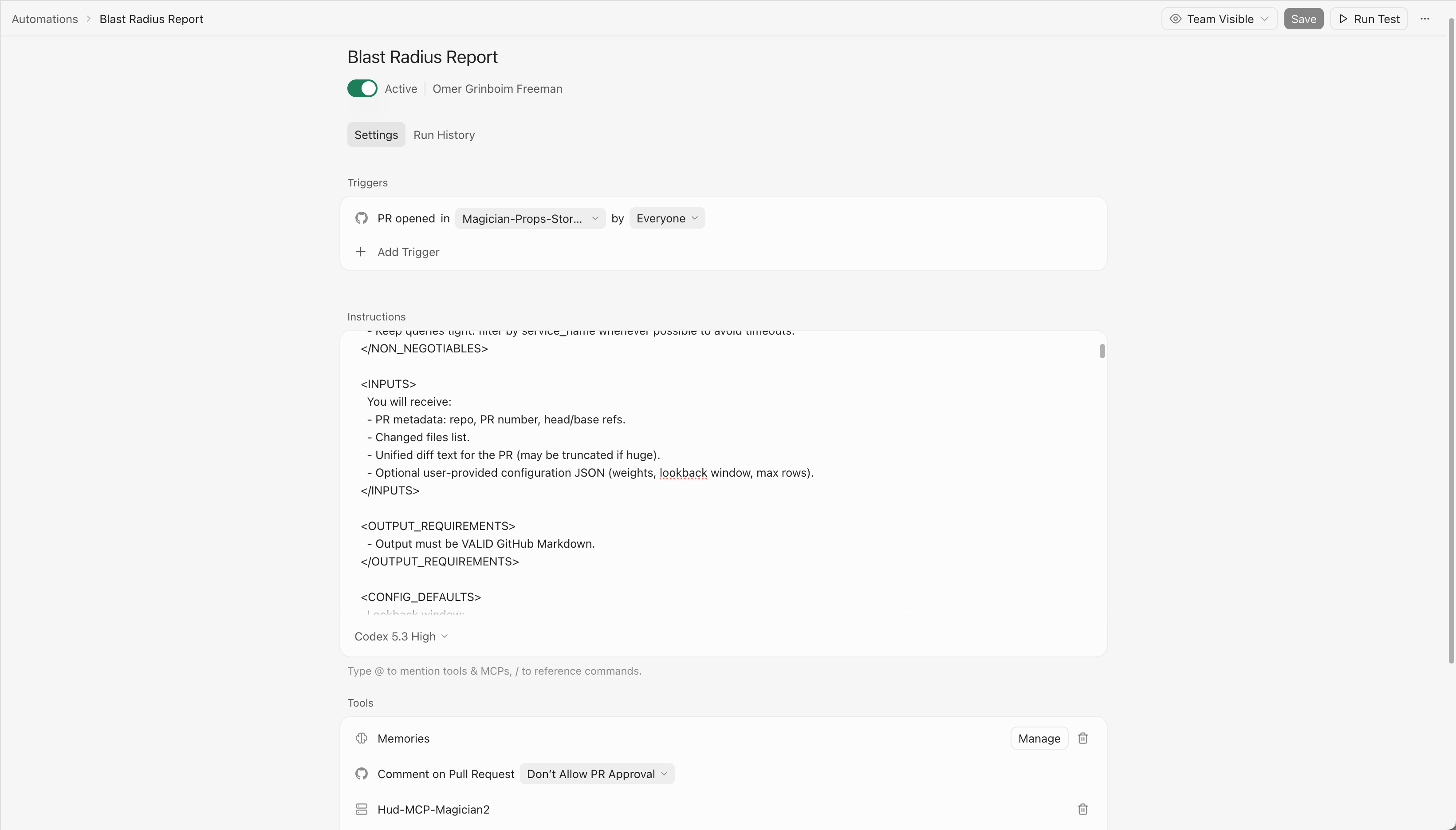
Example Setup
Other Automations You Can Build
Automatic Issue Triage
When Hud detects a production error:
- analyze the stack trace
- identify the failing code path
- open a GitHub issue with context
Detect Optimization Opportunities
Run a scheduled automation that identifies:
- slow endpoints
- expensive hot-path functions
- inefficient downstream calls
Send the report to Slack or GitHub.
Detect Dead Code
Hud tracks invocation counts across all functions.
You can automatically detect functions that never run in production and generate a cleanup report.
Updated 10 days ago