

Deployment monitoring
Hud watches every new deployment and tells you if it made things worse, which PR caused it, and whether to roll back.
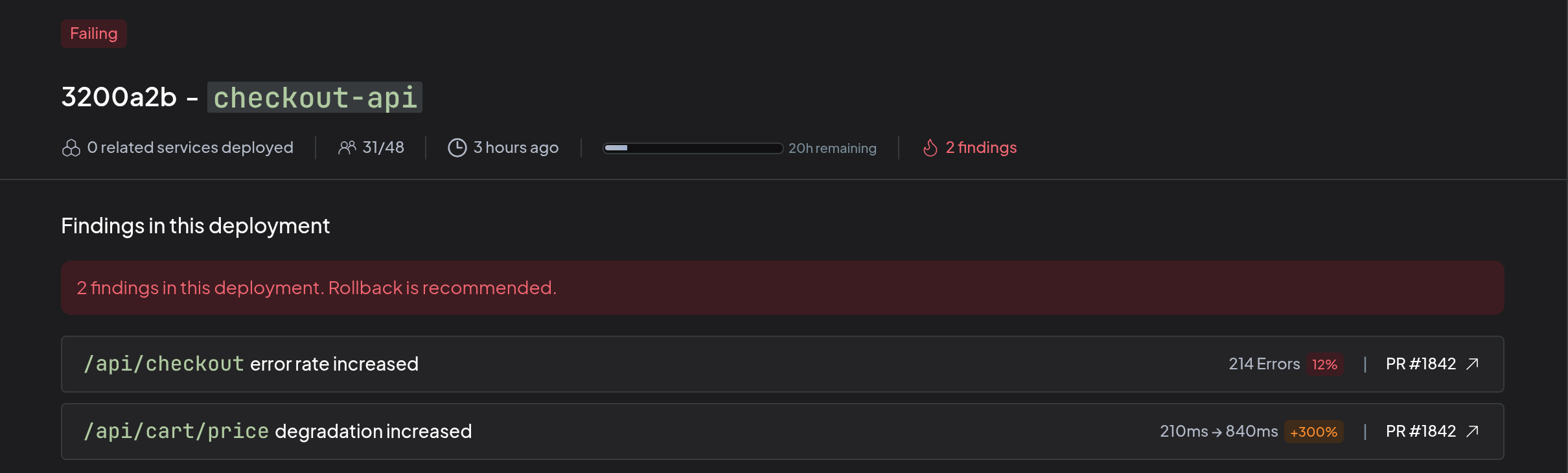
When a service starts running a new version, Hud compares how it behaves in production with earlier versions, for example the error rate and latency of the code that changed. Hud keeps monitoring the deployment until it has seen enough traffic to decide. If the new version performs worse, Hud marks the deployment Failing, identifies the PR that most likely caused it, and recommends whether to roll back.
What you need
Deployment monitoring requires:
- A deployment ID sent from the SDK, so Hud knows when a new version starts running.
- GitHub connected for your account. Hud uses its GitHub App to read your pull requests and commit history.
- An AI provider connected for your account.
- Each service mapped to its repository, a repository Hud's GitHub App can access.
- Agentic enrichment turned on for each service.
Connecting Slack is optional, and is needed only for Slack alerts.
Set it up
1. Send the deployment ID
Set the HUD_DEPLOYMENT_ID environment variable on the running service. Use the commit SHA of the code you deploy, or a version that is also a git tag. This needs Node.js SDK 1.8.11 or later, or Python SDK 0.4.9 or later.
For example, with Docker:
ARG GIT_SHA
ENV HUD_DEPLOYMENT_ID=$GIT_SHAdocker build --build-arg GIT_SHA=$(git rev-parse HEAD) .You can also pass it in code: deploymentId in Node.js, deployment_id in Python.
Hud starts monitoring when it sees a new deployment ID, so the ID has to change with every deploy. That's why the commit SHA works best: it always changes, and Hud can use it to find the PRs merged since the previous deployment. A version number works too if you bump it on every deploy, but Hud may not be able to link it to PRs.
2. Connect GitHub and your AI provider
Go to Settings → Deployments. The top of the page shows what's connected. Select any row without a check mark to connect it.
If you already use the PR risk check, both are already connected. For the steps, see Connect GitHub to Hud and AI provider.
To receive Slack alerts, connect Slack as well.
3. Configure each service
- In Settings → Deployments, scroll to Manage services.
- Select Configure next to the service.
- Under Repository, pick the repository the service is built from, and select Save.
The Track deployment column shows Via SDK once Hud receives a deployment ID for the service, and Not tracking until then. You can map the repository before that; it applies as soon as the first deployment ID arrives.
This is the same mapping the PR risk check uses, so a service you've already linked under Settings → Agentic Workflows is already mapped.
In the same panel, turn on what you want for the service. Both are off by default.
- Agentic enrichment: Hud finds the PR behind each finding, checks that it caused it, and decides whether to recommend a rollback.
- Alerts: posts to Slack when a deployment fails.
Review your deployments
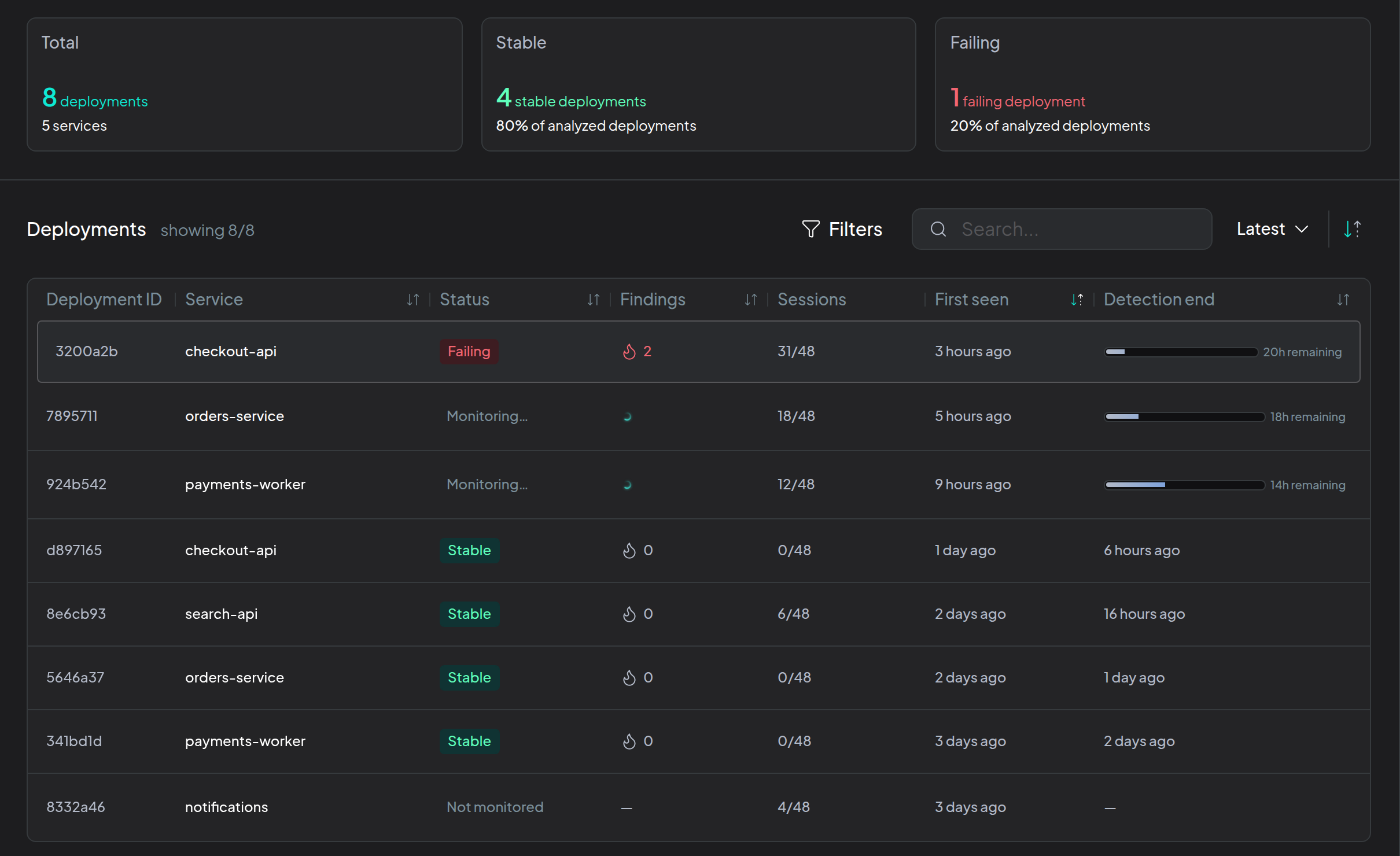
Every new deployment shows up under Explore → Deployments:
- Monitoring: Hud is still watching it.
- Stable: Hud has seen enough and found nothing wrong.
- Failing: Hud found a problem. Failing deployments are pinned to the top.
Open a deployment to see what got worse, the likely PR for each finding, and whether Hud recommends rolling back.
Webhook
Use the webhook to act on a failing deployment from your own tools, for example to start a rollback in your deploy pipeline.
- Go to Settings → Deployments and scroll to Mitigation.
- Under Webhook settings, enter your Endpoint URL and select Save. Hud creates an Auth secret for it. Copy it to your receiver.
- Select Test webhook to send a test request to the URL.
When Hud calls it
Hud sends a POST when a deployment fails, and again if new findings show up for it.
- With Agentic enrichment on, Hud calls the webhook after it checks the findings against the deployment's PRs. The request includes only the findings Hud confirmed, and
recommendationisrollbackorno-rollback. - With it off, Hud calls the webhook as soon as it detects the problem, and
recommendationisnull.
{
  "serviceName": "checkout-api",
  "environmentName": "production",
  "deploymentId": "9f3c2a1b7e4d5c6f8a9b0c1d2e3f4a5b6c7d8e9f",
  "recommendation": "rollback",
  "findings": [
    {
      "entityId": 4821,
      "entityName": "POST /api/checkout",
      "detectedRule": "error-rate",
      "detectionResult": {
        "fingerprint": "TypeError: Cannot read properties of undefined",
        "rate": 0.12,
        "window": "last10m",
        "baseline": { "peak": 0.01, "series": "hourly" },
        "thresholds": { "rate": 0.03, "minErrors": 10, "minNewRate": null, "otherDeploymentsRatio": null },
        "errors": 84,
        "invocations": 700,
        "otherDeploymentsRate": null,
        "comparedWithOtherDeployments": false
      }
    }
  ]
}
detectedRule says what Hud found: errors-in-new-flow, new-error-fingerprint, error-rate or duration. detectionResult holds the numbers behind it, and its fields depend on the rule. Hud will track more over time, so expect new rules and fields, and ignore the ones you don't know.
Verify the request
Each request carries an X-Hud-Signature-256 header: sha256= followed by the HMAC-SHA256 of the raw body, signed with your auth secret. Compute the same value on your side and reject the request if they don't match. In Node.js:
const crypto = require('crypto');

const expected = 'sha256=' + crypto.createHmac('sha256', secret).update(rawBody).digest('hex');
const valid = crypto.timingSafeEqual(Buffer.from(expected), Buffer.from(signatureHeader));
Your endpoint must be reachable from the internet and answer with a 2xx within 10 seconds. If it doesn't, Hud tries twice more, then gives up.
Removing the URL also deletes the secret. When you save a URL again, Hud creates a new secret, so update your receiver.
Rollback policy
Under Rollback policy, write the rules Hud should follow when it decides whether to recommend a rollback, such as "Payments can always be rolled back, even after a migration." Your policy wins over Hud's own rules when they conflict. Hud uses it only for services with Agentic enrichment on.
Updated about 13 hours ago