

Merge Gateway
One gate for every pull request: your checks, plus how the code it touches runs in production.
Coding agents open PRs faster than your team can review them. The Merge Gateway brings runtime context to every PR: it checks each one against your review policy and against how the code it touches runs in production.
Low-risk PRs take the fast track, where someone can approve them in one click. The rest go to manual review with the reason and an impact map, so they clear faster too. Hud approves or merges on its own only if your team turns that on.
How a PR moves through the gate
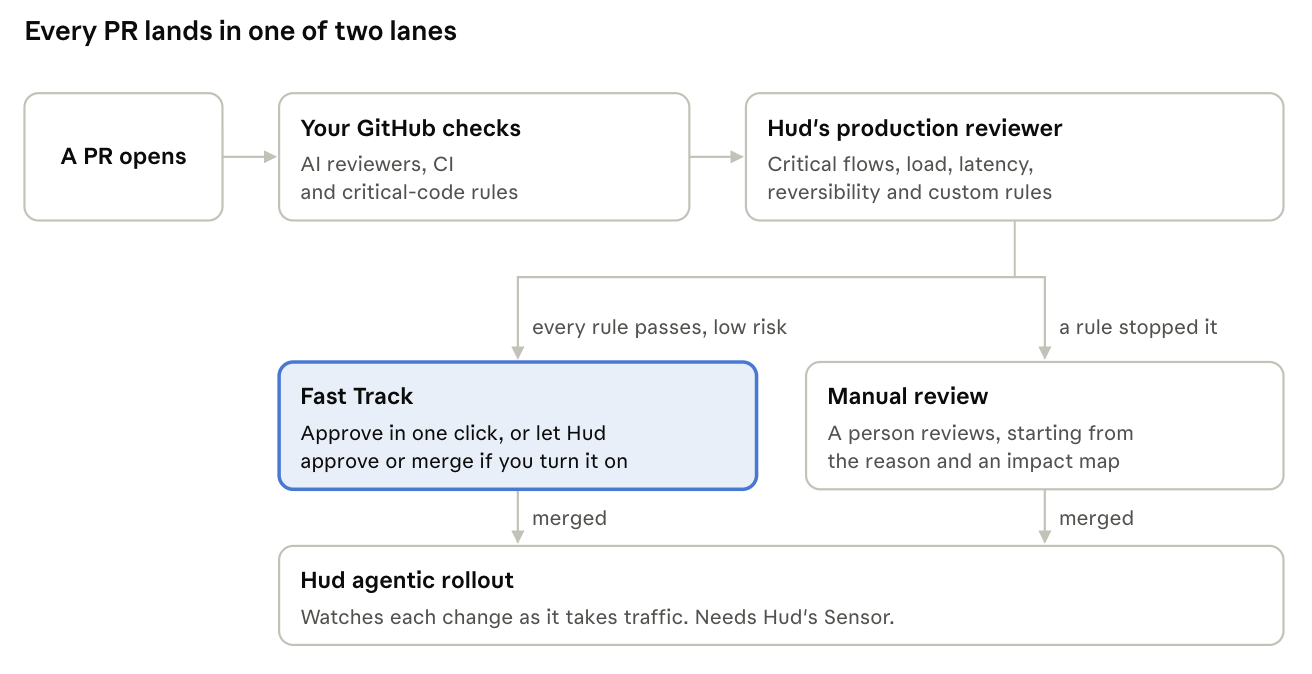
Your GitHub checks run first, then Hud's production reviewer. If every rule passes and production risk is low, the PR takes the fast track. Otherwise it goes to manual review. After the merge, Hud agentic rollout watches the change.
Fast Track and Manual review
Every PR the gate checks lands in one of two lanes. Hud posts its decision as a comment on the PR and shows it on the Pull Requests page.
| Lane | A PR lands here when | What you get |
|---|---|---|
| Fast Track | Every rule in your policy passes, and Hud's production reviewer finds low production risk | The decision and the reason. Approve the PR in one click, or approve every fast-tracked PR at once with Approve Fast Tracked. |
| Manual review | Any rule stops it: a reviewer's finding, a failed check, critical code or production risk | The rule that stopped it, and an impact map from the endpoint to the changed code to what it calls. When it can, Hud suggests the change that would put the PR on the fast track. |
On a manual-review PR, Prompt to Fix hands the problem to the author's coding agent, and Approve anyway lets a reviewer overrule the gate. Each decision asks Was this decision right?, and Analytics compares Hud's decisions with what your reviewers did.
How much Hud does on its own
The policy's autonomy setting decides who approves and merges a fast-tracked PR. Every policy starts in dry run. Auto-approve and auto-merge work only after your team turns them on.
| Autonomy | Hud | A person |
|---|---|---|
| Dry run (default) | Posts its decision as a comment | Approves and merges |
| Auto-approve | Approves Fast Track PRs | Merges |
| Auto-merge | Approves and merges Fast Track PRs | Nothing to do |
At every level, a PR in manual review waits for a person.
Your policy
Hud drafts your first policy for you. It reads your last 100 PRs, with their reviews, CI runs, comments and rollbacks, and what production shows. Then it proposes:
- Your GitHub checks: the reviewers and CI checks you already run.
- Your critical code: the paths that drew the most comments, failures and rollbacks.
- Your critical flows: endpoints that carry a lot of traffic, fail often or have alerts.
- Fast Track rules: low production risk, and nothing critical in the path.
You can change any rule. Before you turn the policy on, Simulate policy replays your 20 most recent PRs through it and shows where each would land. Nothing is approved, merged or commented on.
When you select Activate, Hud checks your open PRs right away, then every new PR as it opens. Each change to the policy makes a new version, listed in its change log.
What Hud needs
- GitHub: read-only access to your repositories. Hud reads PRs, reviews, CI runs and comments, and posts its decision as a comment.
- Production data: from Hud's Sensor, your observability stack, or both. With the Sensor, Hud sees every call to every function and can fast-track more PRs. Your observability stack is read-only, and you add nothing to your services. See Where Hud runs.
Without production data, Hud can't rate production risk, so every PR goes to manual review.
After the merge
The last part of the policy, Hud agentic rollout, sets how Hud watches each change after it merges. It needs Hud's Sensor and doesn't run on your observability stack alone.
- Deployment monitor: checks the endpoints each merged PR touched for errors and latency, for 15 to 180 minutes. You choose whether it watches fast-tracked PRs, manually reviewed PRs or both, and whether a regression posts to Slack or calls a webhook.
- Feature flag monitor: when a flag turns on, compares the code behind it with the flag off. On a regression, Hud can turn the flag off, call a webhook or post to Slack.
- Auto rollback: when a deploy regresses, your revert policy decides whether Hud rolls it back or alerts the owner.
What the Merge Gateway doesn't do
- It doesn't judge whether your logic is correct. Your reviewers and CI do that, and their results are rules in your policy.
- It doesn't approve or merge on its own unless your team turns that on.
- It doesn't fast-track what it can't judge. Code with no production data yet goes to manual review, and by default so do changes that are hard to undo, such as schema migrations.
- It isn't your CD. Your deploy pipeline still ships the code.
Next steps
- Quick start: connect GitHub and production data, and activate your first policy.
- Where Hud runs: what the Sensor and your observability stack each support.
- Put Hud to work: what to do with each lane on your PRs.
Updated 15 minutes ago