

Added
Service Groups – Each team sees its own services
October 5th, 2026
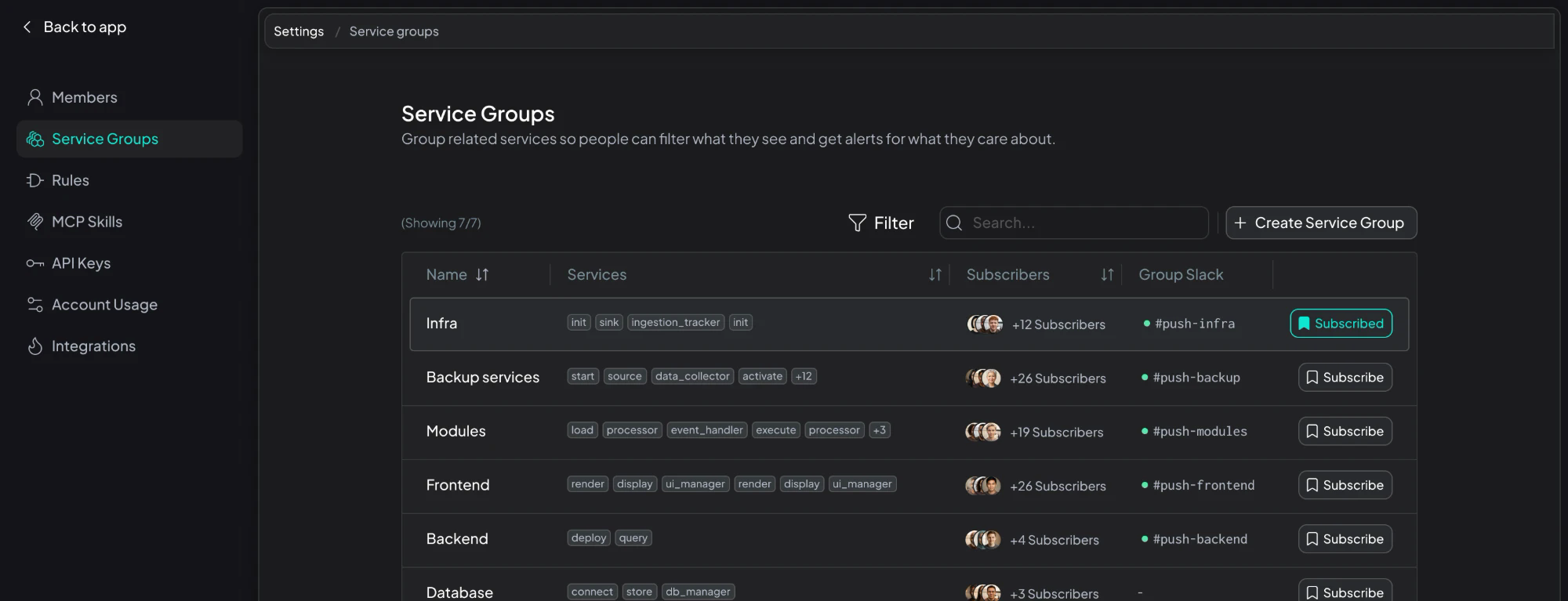
Group related services, subscribe to the groups you own, and send each group's alerts to its own Slack channel.
What's New
- Service groups in Settings: You can create groups in Settings → Service Groups and add services to them. Use a group per team, product area or domain. A service can belong to more than one group.
- Subscribe to the groups you own: Anyone can subscribe to the groups they care about, or add teammates to a group.
- Your services, everywhere in Hud: By default, every product page shows your Favorite services plus every service in your subscribed groups. Use the service filter at the top to switch to just Favorite services, just My service groups, specific services, or All Services.
- A Slack channel per group: Set a channel for each group, per environment. Alerts for a service go to the channels of every group it belongs to. If none of its groups has a channel for that environment, the alert goes to the default channel (defined on Settings → Integrations).
- Coming soon: your coding agent knows your groups: Hud MCP server will scope queries to the services in your groups, or all services. It will still start from all services mapped to the current repo, when available.
Try it out
Go to Settings → Service Groups, create a group, add its services and set its Slack channel. Then ask your team to subscribe. Full guide: Service groups.