

Added
Prompt to Fix for Every Issue — From Detection to Fix in One Click
April 15th, 2026
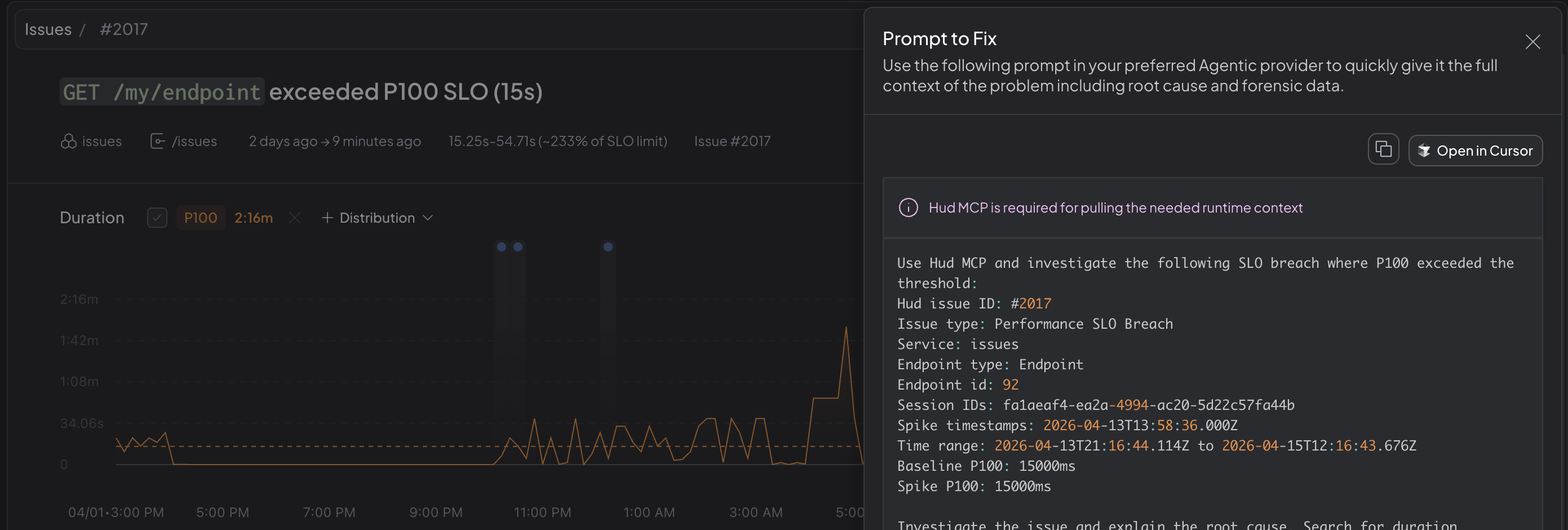
Every issue in Hud now has a ready-made prompt you can copy into your AI coding agent, turning any issue page into a direct launch point for agentic investigation and remediation.
What's New
- Prompt to Fix for all issue types — Each issue type gets a dedicated prompt that identifies the problem and tells the agent exactly which Hud MCP tools to call.
- Powered by Hud MCP — Prompts are now based on MCP rather than embedding context inline. This means your agent gets access to the full depth of Hud's production data during investigation. The result is richer, more accurate investigations with real production context.
- Open in Cursor — If you're using Cursor with Hud MCP installed, an "Open in Cursor" button sends the prompt straight to your agent.
Why It Matters
Before, only error issues had a guided path from Hud into your coding agent, with a large but partial inline context. Now, every issue page is a one-click bridge to agentic investigation, backed by the full production context Hud provides through MCP.
How to Use
Open any issue and click "Prompt to Fix" to get a ready-made prompt for your AI coding agent. For best results, install Hud MCP if you haven't already.